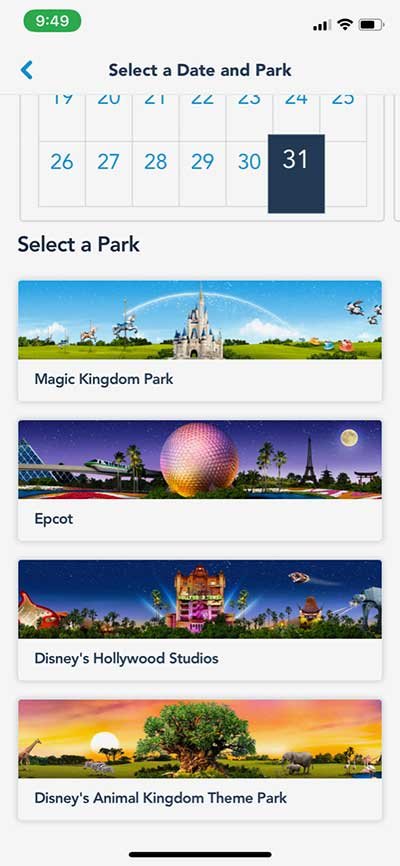
Imagine a single device in your pocket that holds the keys to your entire Walt Disney World vacation: your park tickets, hotel room key, dining reservations, PhotoPass memories, and even your ride queue strategy. That’s precisely what the My Disney Experience App & Park Access offers. It’s not just an accessory; it’s an indispensable digital theme park, transforming how you navigate, plan, and enjoy your magical getaway. For anyone visiting Walt Disney World, mastering this app is the difference between a smooth, stress-free adventure and a day of missed opportunities.
Gone are the days of juggling paper tickets, reservations, and maps. My Disney Experience consolidates every facet of your trip into one powerful, intuitive platform. From the moment you start dreaming of Disney until you’re back home reliving the memories, this app is your constant companion, ensuring every moment of magic is within reach.
At a Glance: Your My Disney Experience App Essentials
- Your Vacation Command Center: Download the free app well before your trip; it's essential for all aspects of your visit.
- Link Everything: Connect park tickets, hotel reservations, MagicBands, and your entire travel party (Family & Friends list).
- Plan Ahead: Make dining reservations 60 days out, check in to your resort, and personalize your MagicBand.
- Navigate with Ease: Access interactive maps, real-time wait times, character locations, and find amenities.
- Dining at Your Fingertips: Mobile Order food, make and manage dining reservations, and join walk-up lists.
- Genie & Lightning Lane: Utilize the complimentary Disney Genie for personalized itineraries and upgrade to Disney Genie+ for Lightning Lane access to select attractions.
- Digital Wallet & Key: Use Disney MagicMobile for park entry, PhotoPass, and even unlock your Disney Resort hotel room door.
- Capture Memories: Link PhotoPass photos and videos, including those from attractions, directly to your account.
- Stay Charged: Bring a portable charger – the app is powerful and will consume your phone’s battery!
Welcome to Your Personalized Disney Planning Hub
Think of My Disney Experience (MDE) as the digital heartbeat of Walt Disney World. This free mobile app, available for iPhones, Android devices, and even Apple Watches, is more than just a convenience; it’s a necessity for navigating the modern Disney vacation. Before you even step foot onto Disney property, you’ll be using MDE to organize your plans, purchase tickets, and secure those coveted dining reservations. Once you’re in the parks, it morphs into your personal tour guide, concierge, and even your virtual wallet.
The beauty of MDE lies in its "all-in-one" approach. It's designed to seamlessly integrate all your Disney Resort hotel bookings, theme park tickets, and even special events into a single, cohesive timeline visible under "My Plans." This centralized system is crucial for managing the myriad details that make up a Disney vacation, allowing you to focus more on the magic and less on logistics.
Building Your Digital Bridge: Account Setup and Linking Essentials
Before the magic can truly begin, you need to lay the groundwork within the My Disney Experience app. This involves creating your account, building your travel party, and linking all your vital reservations and tickets. Don't wait until you're at the park gates; get this done well in advance.
Step 1: Create Your Disney Account & Profile
Your journey starts with creating a Disney account. You can do this either on the DisneyWorld.com website or directly within the My Disney Experience app. The credentials you set up will work for both platforms. Your profile will include basic personal details, allowing you to choose a fun Disney character representation, and set your username and password. This foundational step is quick but critical, as it's the anchor for all your subsequent Disney plans.
Step 2: Assemble Your "Family & Friends" List
Disney vacations are often shared experiences, and My Disney Experience makes it easy to manage everyone's plans together. Under the "My Plans" section, you'll find an option to create a "Family & Friends" list. This allows you to add everyone in your travel party, from immediate family to extended friends.
You can add companions manually by entering their names and ages, or by connecting with them directly via email or a QR code if they already have their own Disney accounts. Linking ensures that you can share plans, book Lightning Lane selections for the entire group, and coordinate dining reservations without hassle. It's an essential feature for group travel, making sure no one gets left out of the fun.
Step 3: Linking Your Tickets and Passes
This is perhaps the most crucial linking step for park access. Without linked tickets, you can't enter the parks or make most other reservations.
- In the App: Tap the three horizontal lines (menu icon) in the bottom right corner, then select "Tickets and Passes." Look for a blue "+" icon and choose "Link Tickets & Passes."
- On the Web: Go to "My Disney Experience," then "My Plans," and click the ticket icon before selecting "Link Tickets."
You’ll typically link your tickets using a reservation number from your email confirmation or an E-ticket. Some tickets also have a barcode you can scan directly. Remember to assign each linked ticket to the correct member of your "Family & Friends" list. This step directly enables your My Disney Experience App & Park Access for theme park entry.
Step 4: Connecting Your Hotel Reservation
If you're staying at a Disney Resort hotel, linking your reservation unlocks a host of convenient features, from mobile check-in to using your phone as a room key.
- In the App: Tap the three horizontal lines (menu icon), then navigate to "Hotel Reservations." You'll need the last name associated with the reservation and your confirmation number.
It’s worth noting that if you’ve booked a partner hotel (not directly owned by Disney World), it might take a few extra days for your reservation to appear in the app after linking. Be patient, but check back regularly.
Step 5: Linking Your MagicBands
MagicBands are optional but incredibly convenient wearable devices that link to your My Disney Experience account. If you’re a Disney Resort hotel guest, your customized MagicBands are often automatically linked to your reservation and appear in your app profile.
If you have an existing MagicBand or purchase one separately:
- In the App: Tap the three horizontal lines (menu icon), then "My Profile." Select "MagicBands and Cards" and choose "Link Your MagicBand or Card."
- You'll then input the ID number found on the back of the MagicBand or scan its barcode. Remember to assign it to the correct person in your travel party.
MagicBands offer another seamless way to handle your Acc Disney experience, from park entry to purchases.
Step 6: Setting Up Your Payment Method
For ultimate convenience, especially with mobile ordering and MagicBand purchases, you'll want to add a payment method to your My Disney Experience account.
- In the App: Go to "My Profile" and select "Payment Method." Here, you can add credit/debit cards or even Disney Rewards Redemption Cards.
For Disney Resort hotel guests, you can even charge purchases directly to your resort folio using your MagicBand or Disney MagicMobile, streamlining your spending within the parks. A single PIN is typically used for all members on the account with charging privileges, so choose one that’s easy to remember but secure.
Your Pre-Arrival Playbook: Planning Made Easy
The My Disney Experience app truly shines in the weeks and months leading up to your vacation, offering crucial tools to shape your itinerary and secure essential experiences. Proactive planning using MDE is the key to maximizing your time and enjoyment.
Securing Those Coveted Dining Reservations
Dining at Walt Disney World is an experience in itself, from character meals to signature restaurants. Popular spots book up quickly, so understanding the reservation window and how to use MDE is vital.
- When to Book: Disney Resort hotel guests enjoy a significant advantage, able to make Advance Dining Reservations 60 days in advance of their check-in date, for the entire length of their stay (up to 10 nights). Off-site guests can book 60 days in advance, but only for each specific day of their trip.
- The Early Bird Gets the Table: Reservation windows open at 6 a.m. EST. Set your alarms and be ready!
- How to Book:
- In the App: Tap the "+" button at the bottom of the screen, then select "Check Dining Availability."
- On the Web: Navigate to "Things to Do," then "Make Reservations."
The app allows you to filter by date, time, party size, specific park, resort, area, cuisine, price range, and even dining experiences like character meals or dinner shows. You can also filter by restaurants participating in the Disney Dining Plan if you've purchased one.
Important Note: For table-service dining within a theme park, you must have valid park admission and a theme park reservation for that specific park on that day. However, if you have Park Hopper tickets, you can book dining reservations in another park for later in the day, after your initial park entry. This flexibility is another excellent feature of the My Disney Experience App & Park Access system.
Streamlined Resort Check-In
For Disney World Resort hotel guests, the My Disney Experience app dramatically simplifies the check-in process, often allowing you to bypass the front desk entirely.
- Before Arrival: Access "My Resort" from the app's homepage. Here, you can complete mobile check-in, adding a PIN for room charging, providing contact information, making room location requests (though not guaranteed), and specifying your expected arrival time.
- Digital Room Key: Once your room is ready, the app will notify you with your room number. You can then use the app’s "Direct-to-Room Service" functionality to unlock your door – a true convenience after a long day of travel! This effectively turns your smartphone into a digital room key, integrating seamlessly with your Acc Disney experience.
Unlocking Park Magic: Essential In-Park Features
Once you've arrived and stepped into the theme parks, the My Disney Experience app transitions from a planning tool to your indispensable real-time guide. It's designed to enhance every moment of your park day, from finding your favorite character to minimizing wait times.
Real-Time Navigation: Never Get Lost Again
The days of unfolding paper maps are largely over. With location services enabled on your device, the MDE app's interactive map feature becomes your best friend.
- Pinpoint Your Location: See exactly where you are within the park.
- Find Anything: Search for attractions, restaurants, character greetings, restrooms, Guest Services, shops, and even transportation points like bus stops or parking lots.
- Real-Time Data: The map displays live attraction wait times, show schedules, and park hours, helping you make on-the-fly decisions.
- Filter with Precision: The Guest Services filter is incredibly robust, allowing you to locate everything from ATMs and first aid stations to Baby Care Centers, Rider Switch locations, and Lost and Found. It even shows AEDs and service animal relief areas.
This robust navigation system ensures you spend less time searching and more time experiencing the magic.
Contactless Dining Experiences
Mobile dining has revolutionized eating in the parks, reducing lines and making meal planning incredibly efficient.
- Mobile Order: This feature is a game-changer for quick-service restaurants. You can browse menus, customize your order, and pay ahead directly through the app. When you're near the restaurant, simply tap "I'm Here, Prepare My Order," and you'll receive a notification when it's ready for pickup. No more waiting in long lines!
- Dining Reservations Management: Need to check in for your pre-booked table-service reservation? The app allows you to do so digitally, often notifying you when your table is ready.
- Join Walk-Up Waitlists: For spontaneous dining, the "Check Dining Availability" feature isn't just for advance reservations. It also shows which table-service restaurants are currently accepting walk-ups, allowing you to join a virtual waitlist from your phone.
- Browse Menus: Every restaurant's menu is available in the app, often with dietary restriction filters, making it easy to plan your meals. QR codes around the parks also offer quick links to digital menus within the app.
Disney Genie Service: Your Personalized Itinerary Assistant
The complimentary Disney Genie service, built right into the My Disney Experience app, is designed to help you make the most of your day. It’s essentially a personalized itinerary planner that responds to your interests and real-time park conditions.
- Tell Genie Your Interests: Input your favorite attractions, characters, and dining preferences.
- Get Real-Time Tips: Genie provides dynamic suggestions throughout the day, optimizing your schedule based on current wait times, park capacity, and your stated preferences.
- My Genie Day and Tip Board: Access this through the "+" button on the app's homepage. The "Tip Board" gives you a quick overview of current wait times and showtimes, while "My Genie Day" offers your customized itinerary.
Genie aims to reduce the guesswork and maximize your fun without any extra cost.
Disney Genie+ and Lightning Lane Systems: Bypassing the Standby Line
For those looking to save even more time, Disney offers paid upgrades to access Lightning Lane entrances, bypassing the standby lines at select attractions. This system has evolved, and the My Disney Experience app is your interface for it.
- Genie+ (Multi Pass): This optional paid service allows you to make ride reservations for many attractions. You can typically select up to three rides/attractions before your visit (resort guests can book 7 days ahead for their stay, up to 14 days, while other guests can book up to 3 days ahead). On your park day, after scanning into one Genie+ experience, you can immediately book your next one. While specific tiers may vary, the general principle is to prioritize one Tier 1 attraction or multiple Tier 2 attractions per day.
- Individual Lightning Lane (Single Pass): For some of Disney's most popular attractions (typically one or two per park), Lightning Lane access is sold individually. These are not part of Genie+ and must be purchased separately. You can buy these a la carte to experience high-demand rides without the long wait.
- Premier Pass: This is a higher-tier, all-inclusive pass that combines features of both Genie+ and Individual Lightning Lane, offering access to virtually every ride without individual bookings or booking windows. It's often bundled with exclusive tours or premium vacation packages.
The My Disney Experience app is where you'll make all these selections, manage your return times, and scan your Lightning Lane selections. It's a key component of navigating the new Acc Disney operational procedures.
Disney MagicMobile Service: Your Digital Ticket & Wallet
MagicMobile is a complimentary feature within the MDE app that transforms your smartphone or Apple Watch into a convenient, contactless pass for many theme park and Resort amenities.
- Park Entry: With valid admission and a theme park reservation, use MagicMobile to scan into the parks.
- PhotoPass Connection: Automatically link Disney PhotoPass images to your account by tapping your phone or watch at PhotoPass spots or ride exits.
- Redeem Selections: Use it to redeem virtual queue and Lightning Lane selections.
- Charge Purchases: Disney Resort hotel guests can even charge purchases to their room folio.
You can customize your MagicMobile pass with different Disney-themed designs and save it directly to your Apple Wallet (for iOS users). MagicMobile and MagicBands are interchangeable, offering flexibility based on your preference.
Accessibility Services at Your Fingertips
Disney is committed to accessibility, and MDE helps you navigate services like the Disability Access Service (DAS) and Rider Switch. You can find information and often make return time selections directly through the app, making your visit smoother if these services are needed.
Memories & PhotoPass: Relive the Magic
Disney PhotoPass photographers are stationed throughout the parks to capture your magical moments. The My Disney Experience app acts as your central hub for these cherished memories.
- Automatic Uploads: After a ride, simply scan your MagicBand or MagicMobile at the exit, and your attraction photos and videos will automatically upload to your account.
- Professional Photos: PhotoPass photographers scan your MagicBand, MagicMobile, or a PhotoPass card, and those photos instantly appear in your app.
- Magic Shots: Look out for "Magic Shots," where photographers can add Disney characters or special effects to your photos.
- Memory Maker: If you purchase Memory Maker (either in advance or during your trip), you gain unlimited digital downloads of all your PhotoPass photos and videos. The app allows you to view, edit, and share these memories, a fantastic way to extend the Acc Disney experience long after you've left the parks.
Direct-to-Room Service & Resort Amenities
For Disney Resort hotel guests, the app extends its utility beyond the theme parks, directly into your resort experience.
- Unlock Your Room: As mentioned, your phone becomes your room key.
- Chat with a Cast Member: Need fresh towels or have a question? You can chat directly with a Cast Member via the app, saving you a trip to the front desk.
- Bus Arrival Times: Get real-time estimates for bus arrival times at your resort, helping you plan your commute to the parks.
Shop in Store: A New Way to Checkout
At select merchandise locations, the "Shop in Store" feature allows you to scan items with your phone and check out directly in the app. This can save you time waiting in line at the register, getting you back to the magic faster.
Play Disney Parks App Integration
For those moments in line, the My Disney Experience app integrates with the separate, but complementary, Play Disney Parks app. This app offers interactive games, trivia, and achievements that can be unlocked while waiting in queues or exploring the parks, making wait times feel shorter.
Troubleshooting & Pro Tips for a Seamless Day
The My Disney Experience app is powerful, but like any technology, it benefits from a few smart practices to ensure a smooth experience.
Always Be Charging
This is perhaps the most critical piece of advice: bring a portable charger (power bank) for your phone. The MDE app uses location services, real-time data, and constant connectivity, all of which are significant drains on your battery. A dead phone means no park access, no mobile orders, and no wait times, which can severely impact your day. Consider bringing two, or a high-capacity one. Many kiosks in the park also sell FuelRod portable chargers for swapping, though bringing your own is often more cost-effective.
Download and Explore Early
Download the My Disney Experience app and spend time exploring its features before your trip. Familiarize yourself with the layout, practice making dummy dining reservations, and understand how the Genie service works. The more comfortable you are with the app beforehand, the less stress you’ll experience in the parks.
Enable Location Services and Notifications
For the app's navigation, mobile order pick-up, and real-time alerts (like when your Lightning Lane window opens or your mobile order is ready), location services and push notifications are essential. Make sure they are enabled for the MDE app on your device.
Wi-Fi is Your Friend
Walt Disney World offers free Wi-Fi throughout its theme parks and resorts. Utilizing this instead of your cellular data can save on your data plan and often provide a more stable connection, especially in crowded areas. Connect to "Disney-Guest" wherever you are.
Offline Access & Screenshots
While the app requires an internet connection for real-time updates, having a screenshot of important confirmations (like hotel check-in, dining reservations, or Lightning Lane passes) can be a good backup in case of a temporary connectivity issue or low battery. Just remember, these are static images and won't reflect real-time changes.
Manage Your "Family & Friends" List Carefully
Ensure everyone in your party is correctly linked and that permissions are set as desired, especially if you plan to make Genie+ selections for everyone. Incorrect linking can lead to frustrating delays.
Don't Panic! Cast Members Are There to Help
If you encounter a technical issue with the app that you can't resolve, don't hesitate to approach a Disney Cast Member. They are often equipped to help with app-related problems, from linking tickets to troubleshooting mobile order issues. Guest Relations locations are also available throughout the parks for more complex challenges. Remember, the goal is to make your Acc Disney trip as magical as possible!
Your Disney Day, Digitized: Embracing the Future of Fun
The My Disney Experience App & Park Access isn't just a trendy gadget; it's the core operating system for a modern Walt Disney World vacation. From the meticulously planned dining experiences to the spontaneous decision to hop on a ride with a short wait, MDE empowers you to take control of your day, personalize your adventure, and immerse yourself more deeply in the magic.
By embracing this powerful digital tool, you're not just saving time; you're creating a more seamless, enjoyable, and memorable experience for yourself and your travel companions. Download the app, get familiar with its features, and arrive at the Most Magical Place on Earth ready to unlock every ounce of fun it has to offer. Your digital theme park awaits!